Full Tutorial
# For users following this tutorial:
# !pip install ragpill langchain-huggingface sentence-transformers ipywidgets
# Or if you're developing locally with this repo:
# !uv sync --group docs
Settings
Context: The settings are optional but an easy way to configure for standard use cases. If you need more control over the client that is passed to LLMJudge, you can also pass a pydantic-ai model directly.
To set up mlflow tracking and LLMJudge, you can create a .env file in the root of your project with the following content:
# --- MLflow ---
# URI of your MLflow tracking server (default: http://localhost:5000)
MLFLOW_RAGPILL_TRACKING_URI=http://localhost:5000

# Name of the MLflow experiment (default: ragpill_experiment)
MLFLOW_RAGPILL_EXPERIMENT_NAME=my_experiment

# Human-readable description attached to each MLflow run (default: RAGPill Evaluation Run)
MLFLOW_RAGPILL_RUN_DESCRIPTION=My Evaluation Run

# Optional: credentials for a secured MLflow server
MLFLOW_TRACKING_USERNAME=your_username
MLFLOW_TRACKING_PASSWORD=your_password

# --- LLMJudge ---
# Model name passed to the LLM provider (default: gpt-4o)
RAGPILL_LLMJUDGE_MODEL_NAME=gpt-4o

# Sampling temperature for the judge model (default: 0.0)
RAGPILL_LLMJUDGE_TEMPERATURE=0.0

# Optional: base URL for a custom or self-hosted LLM API endpoint.
# Falls back to OPENAI_BASE_URL, then https://api.openai.com/v1
RAGPILL_LLMJUDGE_BASE_URL=https://your-llm-endpoint/v1

# Optional: API key for the LLM service.
# Falls back to OPENAI_API_KEY if not set.
RAGPILL_LLMJUDGE_API_KEY=sk-...
The cell below loads these settings and prints the resolved values so you can verify your configuration before running evaluations.
from ragpill.settings import MLFlowSettings, LLMJudgeSettings
from pprint import pprint
mlflow_settings = MLFlowSettings()
pprint(mlflow_settings)
llm_judge_settings = LLMJudgeSettings()
pprint(llm_judge_settings)
MLFlowSettings(ragpill_tracking_uri='http://127.0.0.1:5000', ragpill_experiment_name='ragpill_tutorial', tracking_username=None, tracking_password=None, ragpill_run_description='RAGPill Evaluation Run')
LLMJudgeSettings(model_name='openai/gpt-4o', temperature=0.0, base_url='https://openrouter.ai/api/v1', api_key=SecretStr('**********'))
Defining the Testset
For more details on best practices for creating a testset, see the Testsets guide.
Here we showcase the use of tags, attributes and "expected" attribute and how its propagated as default from Case to Evaluator.
from ragpill import Case, Dataset, LLMJudge, TestCaseMetadata, RegexInOutputEvaluator
testset = Dataset(
    cases=[
        Case(
            inputs="What is the capital of France?",
            metadata=TestCaseMetadata(tags=["geography"], attributes={"author": "janine"}),
            evaluators=[
                LLMJudge(rubric="Paris is the capital of France"),
            ]
        ),
        Case(
            inputs="How many r`s are in 'strawberry'? State only the number",
            metadata=TestCaseMetadata(attributes={"author": "joel"}),
            evaluators=[
                RegexInOutputEvaluator(pattern="1", expected=False),
                RegexInOutputEvaluator(pattern="2", expected=False),
                RegexInOutputEvaluator(pattern="3", expected=True),
                RegexInOutputEvaluator(pattern="4", expected=False),
            ]
        )
    ]
)
Creating the Task
In the end we just need a function (or if async: a coroutine) that takes in an inputs-str (usually a question from the user) and returns a str (usually the answer).
We will wrap a very simple pydantic-ai Agent
from openai import AsyncOpenAI
import os
from httpx import AsyncClient

from pydantic_ai import Agent
from pydantic_ai.models.openai import OpenAIChatModel
from pydantic_ai.providers.openai import OpenAIProvider

api_key = os.environ["RAGPILL_LLMJUDGE_API_KEY"]
base_url = os.environ["RAGPILL_LLMJUDGE_BASE_URL"]
model_name = "qwen/qwen3.6-plus:free"
system_prompt = "You are a helpful assistant"
temperature = 0.2

http_client = AsyncClient()

openai_client = AsyncOpenAI(
    max_retries=3,
    base_url=base_url,
    api_key=api_key,
    http_client=http_client,
)
pyai_llm_model = OpenAIChatModel(
    model_name, provider=OpenAIProvider(openai_client=openai_client), settings={"temperature": temperature}
)

agent = Agent(model=pyai_llm_model, system_prompt=system_prompt)
Running the Evaluation
import mlflow
from mlflow import MlflowClient

tracking_uri = mlflow_settings.ragpill_tracking_uri
try:
    client = MlflowClient(tracking_uri=tracking_uri)
    client.search_experiments()
    print(f"MLflow server reachable at {tracking_uri}")
except Exception:
    print(
        f"⚠️  MLflow server not reachable at {tracking_uri}.\n"
        "To track task runs start the server first:\n\n"
        "    mlflow server --backend-store-uri sqlite:///mlflow.db\n\n"
        "Then re-run this cell before continuing."
    )
    raise
MLflow server reachable at http://127.0.0.1:5000
async def task(question: str) -> str:
    result = await agent.run(question)
    return result.output

result = await task("Whats the capital of France?")
result
'The capital of France is Paris.'
from ragpill import evaluate_testset_with_mlflow
from IPython.display import display

async def task(question: str) -> str:
    result = await agent.run(question)
    return result.output


results_df = await evaluate_testset_with_mlflow(
    testset=testset,
    task=task,
    model_params={
        "system_prompt": system_prompt,
        "temperature": str(temperature),
        "model_name": model_name,
    }
)
display(results_df)
Output()
/Users/janine/ragpill/.venv/lib/python3.11/site-packages/pydantic_ai/models/openai.py:363:
UserWarning: Sampling parameters ['temperature'] are not supported when reasoning is enabled. These settings will
be ignored.
  warnings.warn(
🏃 View run shivering-eel-285 at: http://127.0.0.1:5000/#/experiments/1/runs/41a2f7621614499397858b8b710fd700
🧪 View experiment at: http://127.0.0.1:5000/#/experiments/1
| inputs | output | evaluator_result | evaluator_data | evaluator_reason | expected | mandatory | attributes | tags | task_duration | evaluator_name | case_name | case_id | source_type | source_id | input_key | trace_id | |
|---|---|---|---|---|---|---|---|---|---|---|---|---|---|---|---|---|---|
| 0 | How many r`s are in 'strawberry'? State only t... | 3 | True | {'evaluation_name': UUID('862e3b43-0816-4914-8... | Regex pattern "1" did not match output. | False | True | b'{"author":"joel"}' | {} | 8.300706 | RegexInOutputEvaluator | Case 2 | 186316f6b7363af58747eb755446be42 | CODE | RegexInOutputEvaluator | 186316f6b7363af58747eb755446be42 | tr-31fbe3fa24195939e22b9cb3accd3309 |
| 1 | How many r`s are in 'strawberry'? State only t... | 3 | True | {'evaluation_name': UUID('c3bffbad-f529-48bd-9... | Regex pattern "2" did not match output. | False | True | b'{"author":"joel"}' | {} | 8.300706 | RegexInOutputEvaluator_2 | Case 2 | 186316f6b7363af58747eb755446be42 | CODE | RegexInOutputEvaluator | 186316f6b7363af58747eb755446be42 | tr-31fbe3fa24195939e22b9cb3accd3309 |
| 2 | How many r`s are in 'strawberry'? State only t... | 3 | True | {'evaluation_name': UUID('1841aa0b-c08b-4e22-8... | Regex pattern "3" matched output. | True | True | b'{"author":"joel"}' | {} | 8.300706 | RegexInOutputEvaluator_3 | Case 2 | 186316f6b7363af58747eb755446be42 | CODE | RegexInOutputEvaluator | 186316f6b7363af58747eb755446be42 | tr-31fbe3fa24195939e22b9cb3accd3309 |
| 3 | How many r`s are in 'strawberry'? State only t... | 3 | True | {'evaluation_name': UUID('8dba0bf5-a737-405b-a... | Regex pattern "4" did not match output. | False | True | b'{"author":"joel"}' | {} | 8.300706 | RegexInOutputEvaluator_4 | Case 2 | 186316f6b7363af58747eb755446be42 | CODE | RegexInOutputEvaluator | 186316f6b7363af58747eb755446be42 | tr-31fbe3fa24195939e22b9cb3accd3309 |
| 4 | What is the capital of France? | The capital of France is Paris. | True | Paris is the capital of France | The output correctly states that the capital o... | True | True | b'{"author":"janine"}' | {geography} | 6.488402 | LLMJudge | Case 1 | cb0b4aaf80c43c9973aefeda1bd72890 | LLM_JUDGE | LLMJudge | cb0b4aaf80c43c9973aefeda1bd72890 | tr-9c4a0bcdd2ea67283d2a3c1d2a23ab49 |
Mlflow Screenshots
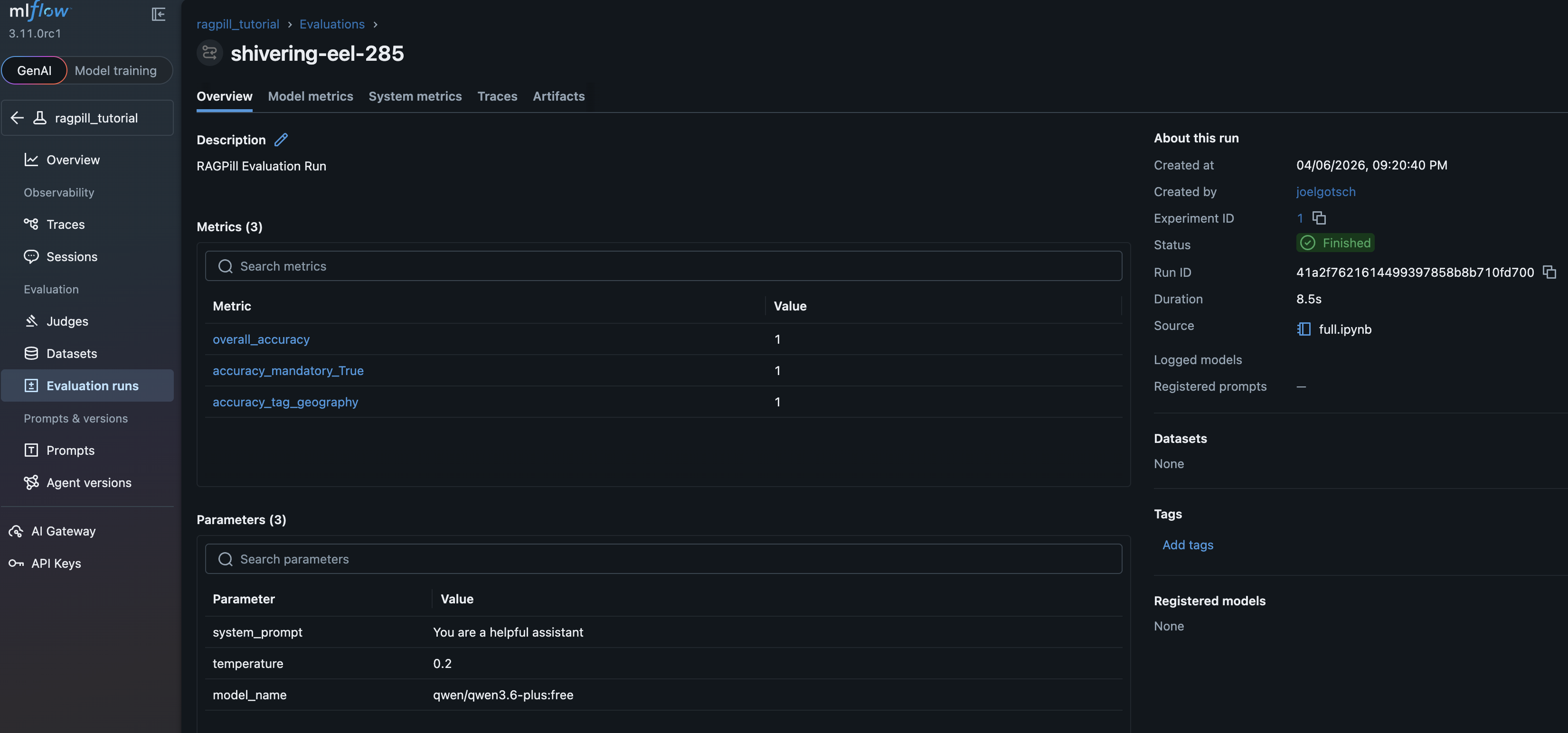
In the UI, go to Evaluation Runs and click on the small Icon next to your experiment run to show it in a new window. There you will see the details of this experiment run, the most important data:
Experiment Overview
metrics per tag and the provided model_params:
Experiment Traces
Assessments (=Evaluator Results) per Trace (=Case):
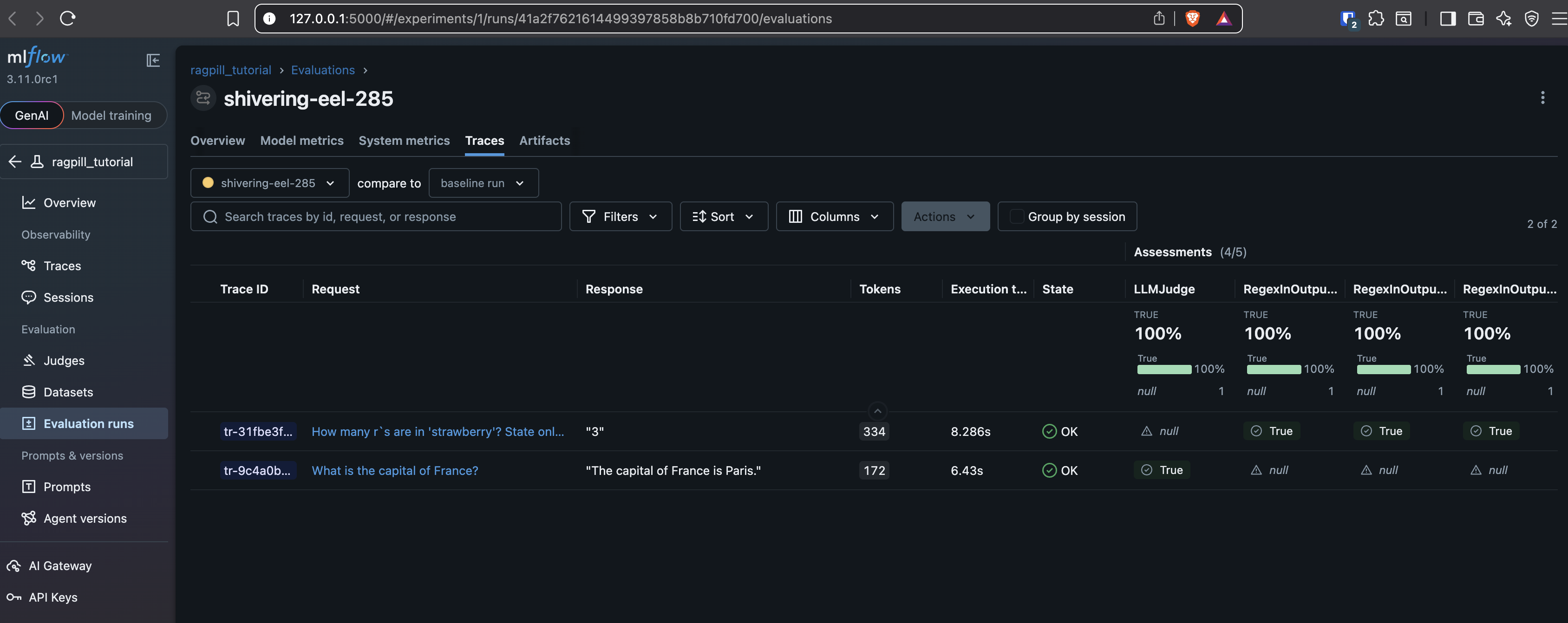
Note: Traces would usually also show the used tool calls and their results, like retrieved Documents if a Retriever was used etc. In this case we had a plain agent without tools.
Experiment Artifacts
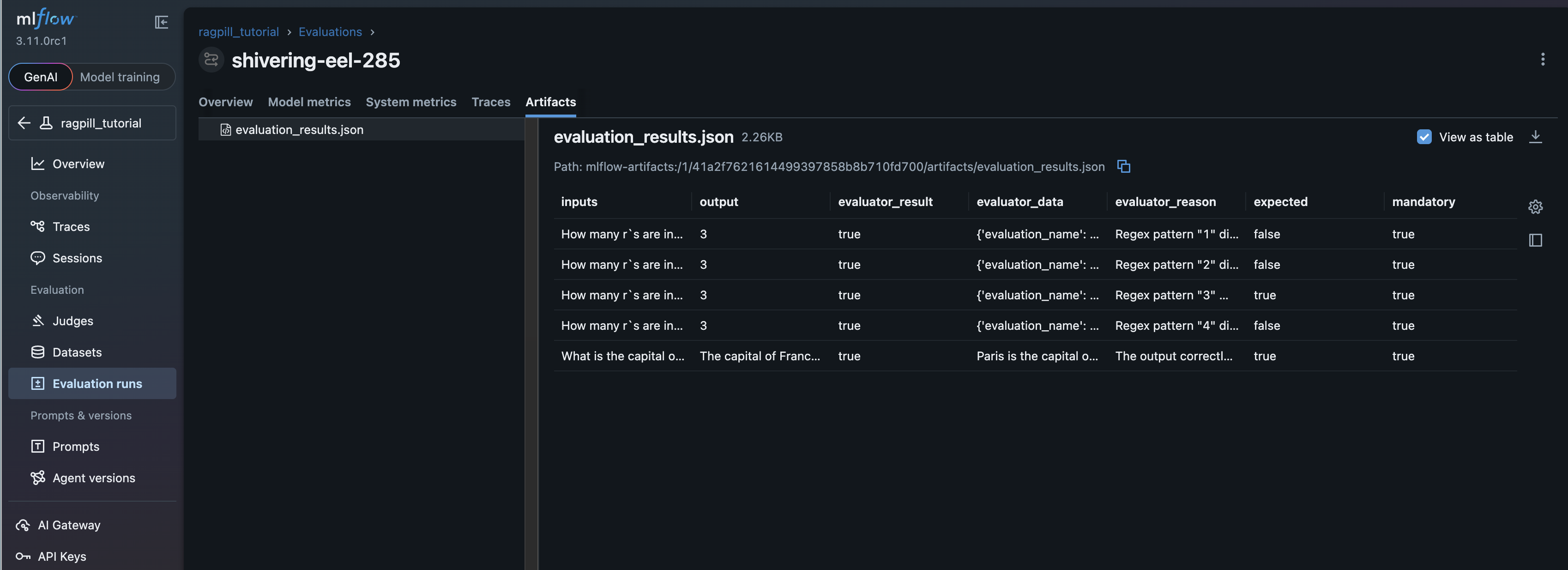
The Dataframe thats also returned from evaluate_testset_with_mlflow